| Company | Products | Support | Ordering | Contact Us | ||
|
CD Tower and Virtual CD Tower
Email Us
©2001 Academy Computer Services, Inc.
|
Configuring Shares Almagamated Widgets
Remember from the previous discussion that the volume and the share aren't the same thing. The volume is identified as /volumename. An identically named share has been assigned to each volume. Security
You can hide a share by assigning the Hidden attribute to a share. But that action alone won't create a secure system. Greater security is achieved by applying access rights to shares using individual user accounts or group assignments. Assigning rights will restrict who can access a share. If you are using firmware version 3.0 or higher you can assign rights to a file or folder as well as to the share. You can also apply a User Quota to a share. A quota limits the amount of storage space a user is allowed in the designated share of the NAS server. Top level shares
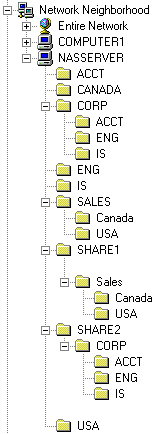
Notice that everything is available under the top level shares (SHARE1 and SHARE2). These shares point directly to the RAID. The CORP and SALES shares are not hidden, so all the shares beneath them are visible to all users.
|
|
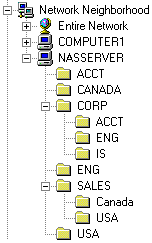 Imagine that Almagamated Widgets, Inc. has an NAS server with two RAIDs: RAID1 and RAID2. RAID1 has a volume named